How to Increase Email Open Rates (Deliverability Guide)
How to increase email open rates by fixing sender reputation, SPF/DKIM/DMARC, and list hygiene: the three things that decide inbox placement first.

Justin Rondeau · Founding Head of Growth, Spoks
· Updated November 16, 2026
Quick answer
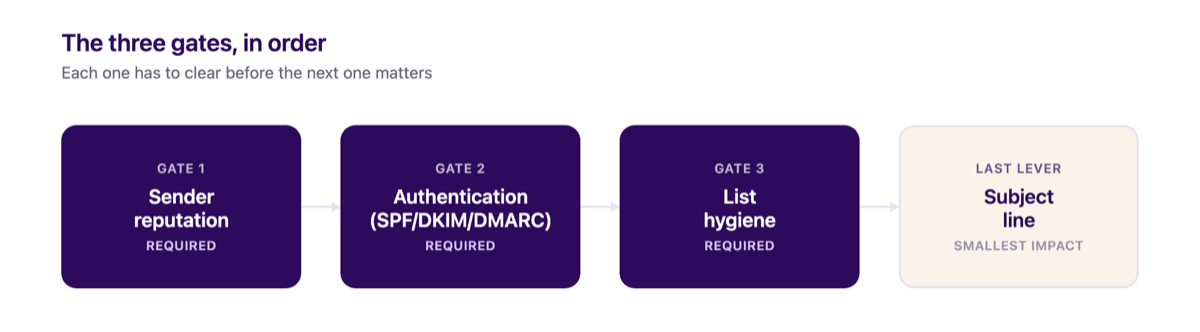
A better subject line won't fix a low open rate if the email never reaches the inbox. Three things gate that, in order: sender reputation (keep spam complaints under 0.1%, ideally under 0.01%), authentication (SPF, DKIM, and DMARC), and list hygiene (stop mailing people who've stopped reading). Fix those three first. The subject line is the smallest lever here.
Still paying Klaviyo's monthly bill?
Spoks runs about 80% cheaper than Klaviyo for the same flows and campaigns.
Table of contents
- Why open rate is a deliverability problem first
- Sender reputation blocks opens before they happen
- Authentication: SPF, DKIM, and DMARC are required
- List hygiene: the subscribers you're protecting by removing them
- Sporadic sending hurts open rates as much as a bad subject line
- Subject lines: specific beats clever
- Open rate and click-through rate aren't the same fix
- Where Spoks fits into this
- FAQ: Email Open Rates
- Sources
Why open rate is a deliverability problem first
If you're searching for how to increase email open rates, or just how to improve open rates generally, the usual advice is a better subject line and a smarter send time. Neither one matters if the email never reaches the inbox.
Open rate is downstream of deliverability, and deliverability is decided by three things most store owners never check: whether mailbox providers trust your domain, whether your email is authenticated, and whether you're still mailing people who stopped reading months ago. This guide covers those three levers, with the actual thresholds mailbox providers publish, not a rounded-off rule of thumb.
If you're trying to figure out when to send instead of why your opens are low, that's a separate question with a separate answer, covered in our guide to the best time to send marketing emails.
Sender reputation blocks opens before they happen
Every inbox provider, Gmail, Yahoo, Outlook, keeps a running score on your sending domain and IP. That score decides whether your email lands in the inbox, the promotions tab, or spam before the recipient ever sees a subject line. If reputation is bad, a brilliant subject line doesn't help, because the email is competing with spam filters that already decided the outcome.
Most sending platforms put that warm-up window at roughly 30 days, though it can run up to 60 days depending on volume.1
That's why a domain that just switched platforms often sees opens dip for a month or two before recovering. The new platform isn't the cause. It's the warm-up period every sender goes through.
Engagement is the single biggest lever inside that window, more than send volume. Postmark's deliverability team calls engagement "the most significant factor" in reputation today, measured by whether people open, read, click, reply, or delete without opening.2
Spam complaints are the sharpest signal of all, and the major mailbox providers each publish their own ceiling:34
| Provider | Complaint-rate ceiling | What it means |
|---|---|---|
| Gmail | Under 0.10% (0.30% is a hard line) | Mail filtered before inbox placement |
| Yahoo | Under 0.30% | Mail filtered before inbox placement |
Cross one of those thresholds on a real send, not a test, and that domain's reputation takes weeks to recover. Every open rate you track during that stretch will read lower than your actual list wants to give you.
One easy reputation drain: a no-reply sending address. Postmark notes that using "no-reply@" indirectly hurts engagement, because recipients who want to respond can't, and that silence reads as low engagement to the mailbox provider on the other end.2
If your From address can't receive a reply, you're giving up a free engagement signal for no real benefit.
Authentication: SPF, DKIM, and DMARC are required
Google and Yahoo made this a hard requirement, not a best practice, starting in 2024. Before that, SPF and DKIM helped your reputation but skipping them rarely blocked a send outright. Google's current sender guidelines require every sender to have at least SPF or DKIM set up, and require both SPF and DKIM, plus DMARC, specifically for anyone sending more than 5,000 messages a day to Gmail addresses.3
If you're sending real marketing volume and skip DMARC, Google's own published guidance puts you out of compliance, not just under-optimized.
Here's what each one actually does and why skipping it costs you opens:
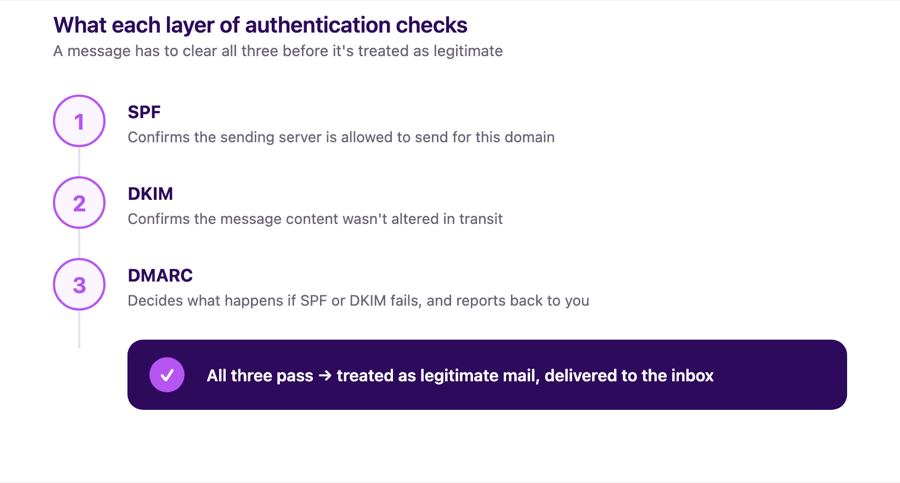
- SPF publishes which mail servers are allowed to send on your domain's behalf. Without it, a receiving server has no way to confirm your email came from where it claims to.
- DKIM signs each message with a cryptographic key tied to your domain, so the content can't be altered in transit without breaking the signature. Google requires a DKIM key of at least 1024 bits for mail to personal Gmail accounts, and recommends 2048 bits if your sending platform supports it.3
- DMARC tells receiving servers what to do when a message fails SPF or DKIM, and reports back to you when it happens. Google's guidance explicitly allows a DMARC policy of
p=noneto start, meaning you can turn it on in monitoring mode before you start rejecting failed mail.3
Most sending platforms authenticate your domain by default, but default setup isn't the same as a verified policy. Authentication isn't something your email platform fully solves just by existing. It's something you have to check is configured correctly on your domain.
The other requirement bundled into Google's current rules: one-click unsubscribe. Marketing email now needs the List-Unsubscribe and List-Unsubscribe-Post headers so a recipient can opt out in a single click, not a buried settings page.3
Ignoring that requirement doesn't just annoy subscribers. It's one more thing that can get mail from a non-compliant domain filtered before the open even has a chance to happen.
List hygiene: the subscribers you're protecting by removing them
Here's the part of "how to improve email open rates" that feels counterintuitive: the fastest way to raise your open rate is often to mail fewer people.
Every email you send to someone who's stopped engaging drags your metrics down twice. It lowers your open rate directly, since that person almost never opens.
It also damages the reputation signal mailbox providers use to decide inbox placement for everyone else on your list, because repeatedly mailing non-engagers is exactly the pattern spam filters are built to catch.2
There's no single universal definition of "never engaged," because the right window depends on how often you send. A store sending weekly can reasonably flag someone after 5 sends with zero opens or clicks over about 6 months; a store sending monthly needs a longer window, closer to 12 months, to give a subscriber a fair chance to engage at all.5 Build the rule around your own cadence, not a number copied from a platform that sends on a different schedule than you do.
What to do with that segment:
- Send one last re-engagement attempt, separate from your regular campaigns, that explicitly asks whether they want to stay subscribed.
- Suppress whoever doesn't respond. Suppression stops email sends to that profile but keeps their data intact, so you're not losing the contact, just stopping the emails that were never getting opened anyway.
- Don't immediately re-suppress someone you just brought back. Give a resurrected subscriber a real window, 60 to 90 days is a reasonable floor, before writing them off again.
One caveat worth knowing before you build that segment: Apple Mail Privacy Protection pre-loads images on some opens, which can make a genuinely unengaged subscriber look like they opened an email they never saw.6
If you're building this filter yourself, click activity is a more reliable signal than opens alone, because clicks require an actual human action.
See it before you switch
Get Started and copy your flows, templates, and contacts from Klaviyo in minutes.
Sporadic sending hurts open rates as much as a bad subject line
A subscriber who gets an email from you every week recognizes your name in the inbox before they even read the subject line. A subscriber who hears from you once a quarter doesn't. By the time that next email lands, they've forgotten signing up, forgotten what you sell, or forgotten you exist at all, and an email from a sender you don't recognize gets deleted or reported, not opened.
That recognition problem compounds the list-hygiene problem above. A store that sends sporadically has a much larger share of subscribers who technically never unsubscribed but have no real memory of the brand, and mailbox providers read a sudden email to a cold list as exactly the kind of behavior spam filters are built to catch.
The fix isn't necessarily sending more. It's sending on a schedule your subscribers can recognize, whether that's weekly, biweekly, or monthly, and sticking to it instead of going quiet for months and then sending a burst of catch-up campaigns. A predictable cadence keeps your name familiar, and familiarity is most of what separates "I'll open this" from "who is this."
Subject lines: specific beats clever
Once reputation, authentication, and list hygiene are handled, the subject line is the last lever and the smallest one. The research behind it is less about creativity and more about what trips a spam filter or a human's scroll-past reflex.
A 2017 analysis of over 300,000 real email threads found all-caps subject lines got replies 30% less often than normal ones, 34.6% versus 50.0%.7 Separately, SpamAssassin, one of the most widely used spam-filtering engines, has a rule (SUBJ_ALL_CAPS) that specifically flags all-caps subject lines as a negative signal. That's a mechanical reason to avoid "FLASH SALE!!!" style subject lines that has nothing to do with taste.
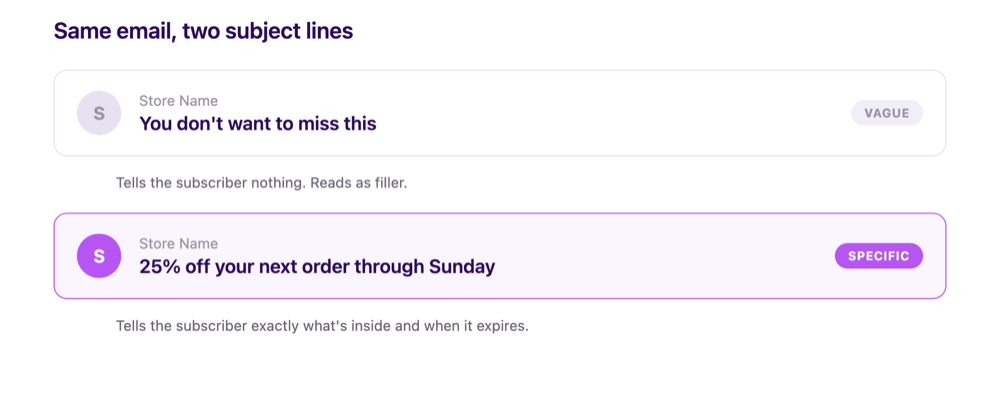
Beyond avoiding the obvious traps, specificity does more work than cleverness. The subject line's job is to accurately preview the email, not to manufacture curiosity the body doesn't pay off.
The subject line types worth rotating through
"Specific" isn't one formula. It's a goal that several different subject line types can hit, and leaning on the same type every send is its own problem: a list that sees the identical structure in every email starts skimming past it before reading a word.
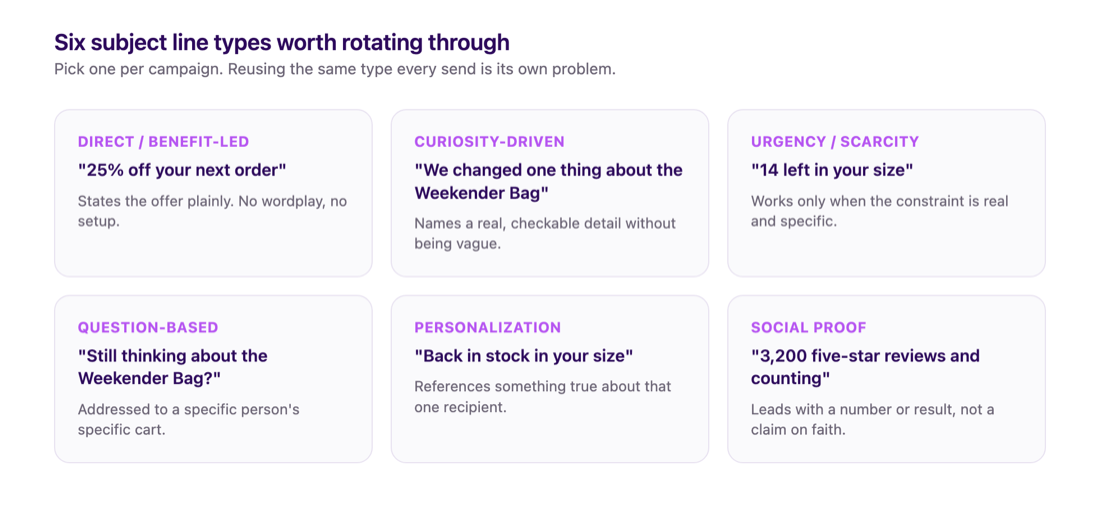
- Direct/benefit-led: states the offer or outcome plainly. "25% off your next order through Sunday." No wordplay, no setup, just the thing being offered.
- Curiosity-driven: withholds one specific detail to earn the open, without being vague about everything. "We changed one thing about the Weekender Bag" works because it names a real, checkable subject; "You won't believe this" doesn't, because there's nothing concrete to be curious about.
- Urgency/scarcity: works only when the constraint is real. "14 left in your size" or "Ends tonight at 11:59pm" both name a specific, verifiable limit, which is what separates real urgency from the manufactured kind subscribers have learned to ignore.
- Question-based: poses something the recipient can answer about themselves. "Still thinking about the Weekender Bag?" works because it's addressed to a specific person's specific cart, not a generic audience.
- Personalization/segment-specific: references something true about that recipient, a past purchase, a browsing category, a loyalty tier, rather than a generic broadcast line.
- Social proof: leads with a number or a result other customers produced. "3,200 five-star reviews and counting" borrows credibility instead of asking the reader to take the offer on faith.
Picking one type per campaign and rotating through the list above across a send calendar does two things at once: it keeps the list from pattern-matching your emails as "the same promo again" before opening, and it naturally produces subject lines that test well against each other, since you're comparing genuinely different approaches instead of five small rewordings of the same sentence.
Open rate and click-through rate aren't the same fix
It's worth separating two different numbers you're probably tracking. Open rate tells you whether the email reached the inbox and got a glance. Click-through rate tells you whether the content inside actually earned action once it was opened.
Fixing reputation, authentication, and list hygiene raises your open rate because it's a deliverability problem. If you want to know how to increase email click through rate specifically, that's a content and offer problem sitting one layer downstream, inside an email that's already landing.
Both numbers matter, but they fail for different reasons. No amount of subject-line editing fixes a deliverability issue, just like no amount of domain warm-up fixes a boring offer.
Where Spoks fits into this
Spoks' segmentation lets you build the exact kind of behavioral filter described above: contacts who received emails but never opened or clicked over a given window, so you can isolate and suppress that group instead of guessing who's unengaged.
Spoks' analytics tracks opens, clicks, and revenue automatically on every send with no pixel or UTM setup, so you can watch whether a list-cleaning pass actually moved your open rate before and after, instead of assuming it worked.
FAQ: Email Open Rates
How do you increase email open rates?
Start with the three things that gate deliverability before the subject line ever matters: confirm SPF, DKIM, and DMARC are set up correctly on your sending domain, remove subscribers who've stopped engaging after a reasonable number of sends, and watch your spam complaint rate, keeping it under 0.1% and ideally under 0.01%. A better subject line only helps once those are in place.
What's a good email open rate?
There's no single universal benchmark, because open rate varies heavily by industry, list size, and whether Apple Mail Privacy Protection is inflating the number for part of your list. A more useful question than "is my open rate good" is whether your spam complaint rate is staying under the thresholds mailbox providers publish (under 0.1% for Gmail, under 0.3% for Yahoo) and whether your open rate is trending up or down after you clean your list.
Does removing subscribers really improve open rates?
Yes, in two ways. It directly removes people who were never going to open anyway, which raises the percentage mechanically. It also protects your sender reputation, since mailbox providers read continued sends to non-engagers as a spam-like pattern, which can suppress inbox placement for your entire list, not just that segment.
Do I need DMARC if I'm a small Shopify store?
Google's bulk sender rules only require DMARC for senders doing more than 5,000 messages a day to Gmail addresses, so a small list may not be required to have one yet. It's still worth setting up early at a monitoring-only policy (p=none), since Google explicitly allows that as a starting point, and you'll already have it in place once your list grows past that threshold.
How often should I clean my email list?
There's no single published schedule, and the right window depends on your own send frequency: a weekly sender can reasonably review every 6 months, a monthly sender needs closer to 12 months to give subscribers a fair chance to engage. Review on whichever cadence matches your own sending, not a number borrowed from a platform that sends on a different schedule.
Does sending frequency affect open rates?
Yes, in both directions. Sending too often to disengaged people burns reputation and raises spam complaints. Sending too rarely means subscribers forget who you are between emails, so an email from an unrecognized sender gets deleted or reported instead of opened. A predictable cadence, whatever frequency you pick, outperforms both sporadic bursts and constant over-mailing.
What's the difference between improving open rates and improving click-through rates?
Open rate measures whether the email reached the inbox and got a glance, which is mostly a deliverability and reputation question. Click-through rate measures whether the content and offer inside earned action once it was opened, which is a copy and offer question. They need different fixes, and a high open rate with a low click-through rate usually means the subject line overpromised what the email delivered.
Does send time affect open rates?
It affects when opens happen more than how many happen. A well-authenticated, well-maintained list will get opened across a wide range of send times; a poorly authenticated or fatigued list won't get opened no matter when you send it. For the actual timing guidance, see our guide to the best time to send marketing emails.
Sources
Sources
Footnotes
-
Twilio SendGrid, "Email Guide for IP Warm Up" (twilio.com): most IP/domain warm-ups finish within 30 days, with up to 60 days for higher-volume senders; reputation is tracked in rolling 30-day windows, and going 30+ days without sending on an IP resets the warm-up. Verified via direct fetch, November 18, 2026. ↩
-
Postmark (postmarkapp.com), "Best Practices to Ensure Great Delivery for Your Email: Part 1": engagement (opens, read time, clicks, replies, deletes-without-opening) described as the most significant factor in sender reputation today; notes that no-reply sending addresses can indirectly suppress engagement. Verified live 2026-11-16. ↩ ↩2 ↩3
-
Google, "Email sender guidelines" (support.google.com/mail/answer/81126): all senders require SPF or DKIM; bulk senders (5,000+ messages/day to Gmail accounts) require SPF and DKIM plus DMARC (policy may start at
p=none), a DKIM key of at least 1024 bits (2048 recommended), a spam rate under 0.30% (0.10% recommended target), and one-click unsubscribe headers (List-Unsubscribe,List-Unsubscribe-Post). Verified live 2026-11-16. ↩ ↩2 ↩3 ↩4 ↩5 -
Yahoo Sender Hub, "Best Practices" (senders.yahooinc.com): "Keep your spam rate below 0.3%," calculated against mail delivered to the inbox. Verified via direct fetch, November 18, 2026. ↩
-
Suped, deliverability guidance on defining unengaged subscribers (suped.com): no single universal threshold exists; recommends scaling the send-count and time-window requirement to the sender's own frequency (illustrative ranges cited: roughly 3 sends/12 months for monthly senders up to 8 sends/90 days for high-volume senders), and checking clicks alongside opens since privacy features distort open data. Verified via direct fetch, November 18, 2026. ↩
-
Litmus, "Apple's Mail Privacy Protection Is Here: What It Actually Means for Email Marketers" (litmus.com, 2021): early estimate of Apple Mail open-rate inflation around 75% at peak MPP adoption, explicitly flagged as a rough prediction rather than a precise figure. Verified via direct fetch, November 18, 2026. ↩
-
Boomerang (blog.boomerangapp.com), "The One Thing You Should Never Do In An Email Subject (Based on Data)," published May 9, 2017, analyzing over 300,000 email threads: all-caps subject lines (n=1,687) got a 34.6% reply rate versus 50.0% for all other subjects (n=300,129), about 30% lower. Also notes SpamAssassin's SUBJ_ALL_CAPS rule flags all-caps subjects as a spam signal. Verified via direct fetch, November 18, 2026. ↩