Email List Cleaning: A Shopify Store's Guide to a Healthier List
A practical guide to email list cleaning for Shopify stores: who to remove, how often, and the real math behind why open rates jump once you do it.

Justin Rondeau · Founding Head of Growth, Spoks
· Updated November 23, 2026
Quick answer
Email list cleaning means finding the subscribers who never open, never click, and never buy, then removing or suppressing them so you stop paying to mail people who've already tuned out.
Removing a quarter of a list's chronically unengaged subscribers can move an open rate from 12% to 16% without writing a single new subject line, because the real openers never leave, the dead weight does.
Still paying Klaviyo's monthly bill?
Spoks runs about 80% cheaper than Klaviyo for the same flows and campaigns.
Table of contents
- What Email List Cleaning Actually Means
- The Real Cost of an Unclean List
- A Worked Example: What Removing Unengaged Subscribers Does to Your Open Rate
- How to Identify Who to Clean Out
- Don't Delete Blind: Run a Win-Back Flow First
- Importing an Old List? Clean It Before You Load It In
- How Often to Clean Your List
- FAQ: Email List Cleaning
- Sources
What Email List Cleaning Actually Means
Email list cleaning isn't deleting your whole list and starting over. It's separating three groups of contacts that most Shopify stores lump together under one "subscribers" number:
- Engaged subscribers who open, click, or buy at least occasionally
- Chronically unengaged subscribers who haven't opened or clicked anything in months, but whose address is still technically valid
- Dead addresses that bounce, belong to spam traps, or were never real people to begin with (role accounts like
info@orpress@a vendor added at signup)
The last two groups cost you money and reputation without ever buying anything. Cleaning a list means finding each group with real criteria, not a gut feeling, and deciding what happens to each one: suppress, re-engage, or remove outright.
The Real Cost of an Unclean List
An unclean list doesn't just waste sends, it actively works against you with inbox providers. The standard bounce-rate benchmark across B2B and B2C sits at 2%, and a bounce rate above that negatively impacts your sender reputation.1 Between 2% and 5%, that's worth investigating. Past that, it's a significant deliverability problem.1
The reason a dirty list pushes bounce rates up isn't mysterious. A typical list decays by about 22.71% every single year, and on an average unverified list, roughly 20.19% of addresses are already invalid.1 Old addresses don't announce themselves. They just sit on your list collecting sends until they bounce, and every bounce nudges your domain's reputation with Gmail, Yahoo, and Outlook a little further in the wrong direction. Spam traps, addresses planted specifically to catch senders with sloppy list hygiene, show up on roughly 0.01% of lists, and a single one can do outsized damage to deliverability.1
None of this is about one bad campaign. It's cumulative: a list that never gets cleaned accumulates more dead weight every month, and every send to that dead weight pulls your reputation down a little further, which is what eventually tips open rates and inbox placement for your entire list, not just the unengaged slice of it.
A Worked Example: What Removing Unengaged Subscribers Does to Your Open Rate
Here's a simple example to show the mechanic. It's a scenario we built to illustrate the math, not a real store's numbers, but the logic holds for any list with a chronically unengaged segment.
Say a Shopify store has 10,000 email subscribers. A typical campaign gets opened by 1,200 real people, the same 1,200-ish every time, because those are the customers who actually read the store's emails. Against the full list of 10,000, that's a 12% open rate.
Now say 2,500 of those 10,000 subscribers, 25% of the list, haven't opened or clicked a single email in the last 180 days. They're not bouncing yet. They're just not reading anything. The store suppresses them from future sends and mails the remaining 7,500.
The next campaign still gets opened by roughly the same 1,200 people, because the unengaged 2,500 weren't contributing opens either way. But now that's 1,200 out of 7,500, a 16% open rate, a 4-point jump with the exact same subject line and send time.
| Before cleaning | After cleaning | |
|---|---|---|
| Subscribers mailed | 10,000 | 7,500 |
| Real opens per send | 1,200 | 1,200 |
| Open rate | 12% | 16% |
Nothing about the store's content got better. The math changed because the denominator shrank while the numerator stayed flat. That's the whole mechanism behind why list cleaning moves open rates, and it's also why a store that chases a better open rate by writing cleverer subject lines, instead of removing the people who were never going to open regardless of subject line, is optimizing the wrong variable.
There's a second-order benefit too: the chronically unengaged segment is disproportionately where that roughly-22.71%-a-year decay shows up, since an address nobody's opened in six months is exactly the kind of address most likely to go stale next.1 Suppressing that segment before it starts bouncing is cheaper than cleaning up a damaged sender reputation after the fact.
How to Identify Who to Clean Out
Use real criteria, not instinct, to sort subscribers into "suppress," "re-engage," or "remove":
Suppress immediately: hard bounces (the address doesn't exist), spam-trap hits if your platform flags them, and anyone who's marked a message as spam. There's no ambiguity here, these contacts should stop receiving mail the moment they trigger the signal.
Flag for re-engagement: subscribers who haven't opened or clicked in 90 to 180 days, depending on how often you typically send. A store sending weekly should use a tighter window than one sending monthly, since "180 days of silence" means something different at each cadence.
Watch, don't touch yet: brand-new subscribers inside their first 30 to 60 days, even if they haven't opened anything yet. A welcome series often needs more than one send to land, and judging engagement before it's had a chance to happen just removes people prematurely.
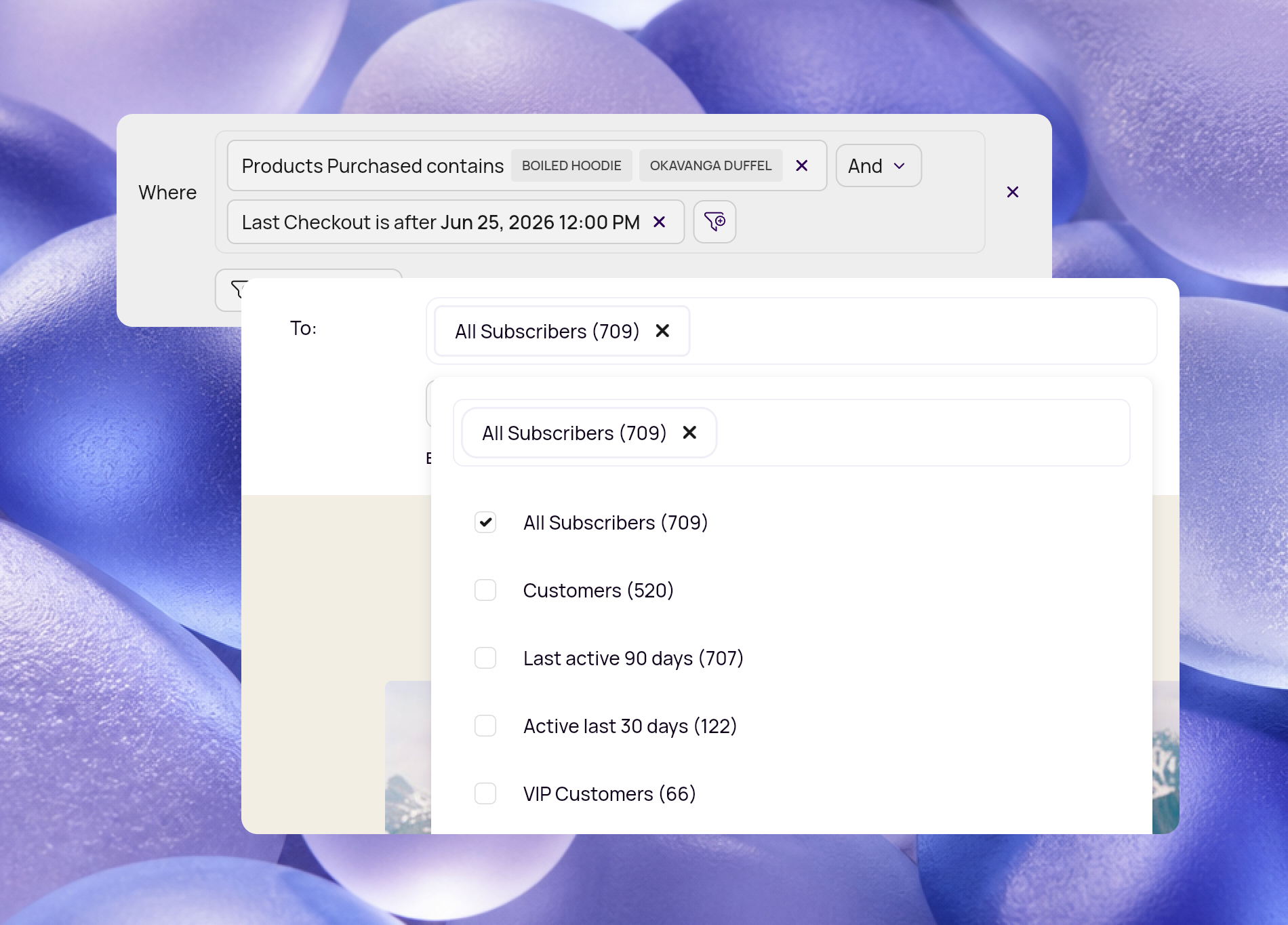
This is exactly what Shopify segmentation tools are for. Spoks' segmentation lets you build a filter like "opened an email zero times in the last 180 days" directly from behavioral data already tied to each contact, so you're not exporting a list to a spreadsheet and guessing at who's gone quiet. The same filter logic works for finding subscribers to re-engage, suppress, or eventually remove, without rebuilding the criteria by hand each time.
See it before you switch
Get Started and your flows import automatically from Klaviyo, no manual rebuild needed.
Don't Delete Blind: Run a Win-Back Flow First
Removing subscribers outright, without ever trying to win them back, throws away contacts who might still convert with the right nudge. Before deleting anyone, run them through a short win-back sequence: one or two emails, a clear reason to come back (a discount, a "we miss you," a product update), and a final message that says plainly you'll stop emailing them if they don't engage.
Automated flows like this consistently outperform one-off sends. Our email marketing benchmarks for Shopify stores found automated flows convert at roughly 19 times the rate of one-off campaigns in one 2025 benchmark, because they trigger off a specific signal (in this case, "about to be removed") instead of landing at a random moment. A win-back flow aimed specifically at your unengaged segment is a far better use of that insight than one more generic newsletter to the whole list.
Whoever doesn't respond to the win-back sequence gets removed. Whoever does respond, opens, clicks, or buys, moves back into your engaged segment and stays on the list. Either way, you've made a real decision about every contact instead of mailing a slowly decaying list indefinitely.
Importing an Old List? Clean It Before You Load It In
The same logic applies, in reverse, the moment you bring a list in from somewhere else: a platform migration, a CSV from a trade show, or a dormant Shopify store you're relaunching. An imported list has no engagement history in your new platform yet, so you can't filter it by "hasn't opened in 180 days" on day one, there's nothing to measure.
Treat an imported list as unverified until proven otherwise. A reasonable baseline for what to expect from any list that's been sitting unused: roughly 20.19% of addresses on an average list are already invalid.1 Run the import through a verification check before the first send if your platform supports it, and send that first message as a short win-back-style email rather than a full campaign, so you're measuring who's actually still there before you commit to mailing the whole thing regularly.
Watch for catch-all addresses too, domains configured to accept mail at any address whether a real inbox exists behind it or not. Verification tools flag these as uncertain rather than valid or invalid, because there's no way to confirm delivery without actually sending. Treat anything flagged that way with the same caution as an unengaged contact until it proves otherwise.
How Often to Clean Your List
Quarterly is a reasonable default for most Shopify stores. List decay is gradual, not sudden, so checking monthly mostly adds noise, while checking once a year lets dead weight accumulate long enough to start affecting deliverability for your whole list, not just the unengaged slice.
Two moments call for an off-cycle clean regardless of schedule: right before a high-stakes send like a Black Friday campaign, when deliverability matters more than usual, and any time your bounce rate crosses that 2% benchmark unexpectedly.1 A sudden jump in bounces usually means something changed, a bad import, a stale segment that got re-included, and it's worth finding out why before your next send rather than after.
Spoks' contacts don't carry a per-contact price tag the way some platforms do, so cleaning a list isn't something store owners put off to avoid a billing hit. If you're deciding where to start, the win-back flow above and a 180-day "no open, no click" filter cover most of what a first cleaning pass needs.
FAQ: Email List Cleaning
How often should I clean my Shopify email list?
Quarterly works for most stores. List decay happens gradually, so monthly cleaning mostly adds noise and yearly cleaning lets dead weight pile up long enough to hurt deliverability for your whole list. Clean off-cycle before a high-stakes send, or any time your bounce rate jumps unexpectedly above the 2% benchmark.
What counts as an unengaged subscriber?
Most stores use 90 to 180 days with no opens and no clicks as the threshold, adjusted for how often you actually send. A store sending weekly should use a tighter window than one sending monthly, since "no activity in 180 days" means something different depending on how many emails that subscriber was actually sent during that window.
Will removing subscribers hurt my list size or revenue?
Your subscriber count will drop, but your real revenue shouldn't, because the people you're removing weren't opening, clicking, or buying anyway. What typically goes up is your open rate, click rate, and deliverability, since inbox providers judge your reputation on engagement rate, not raw list size.
Should I delete unengaged subscribers or just suppress them?
Suppress first, delete later. Suppressing stops the sends without losing the contact record or any purchase history tied to it. Run a win-back flow before deciding to delete anyone outright, since some unengaged subscribers will respond to the right nudge and don't need to be removed at all.
Does Spoks make it easy to find who to clean out?
Yes. Spoks' behavioral segment filters build criteria like "opened an email zero times in the last 180 days" directly from each contact's activity, so you can find and act on your unengaged segment without exporting anything or rebuilding the logic by hand.
Sources
Sources
Footnotes
-
ZeroBounce, "Understanding Email Bounce Rates, Spam Traps, and Deliverability Issues" (zerobounce.net/bounce-rates-email-deliverability). Figures cited: 2% standard bounce-rate benchmark across B2B and B2C, bounce rates above 2% negatively impact sender reputation, 2-5% warrants investigation, higher rates indicate a significant deliverability issue; lists decay by roughly 22.71% per year; roughly 20.19% of emails on an average list are invalid; spam traps appear on approximately 0.01% of lists. Verified via direct fetch, November 23, 2026. ↩ ↩2 ↩3 ↩4 ↩5 ↩6 ↩7